

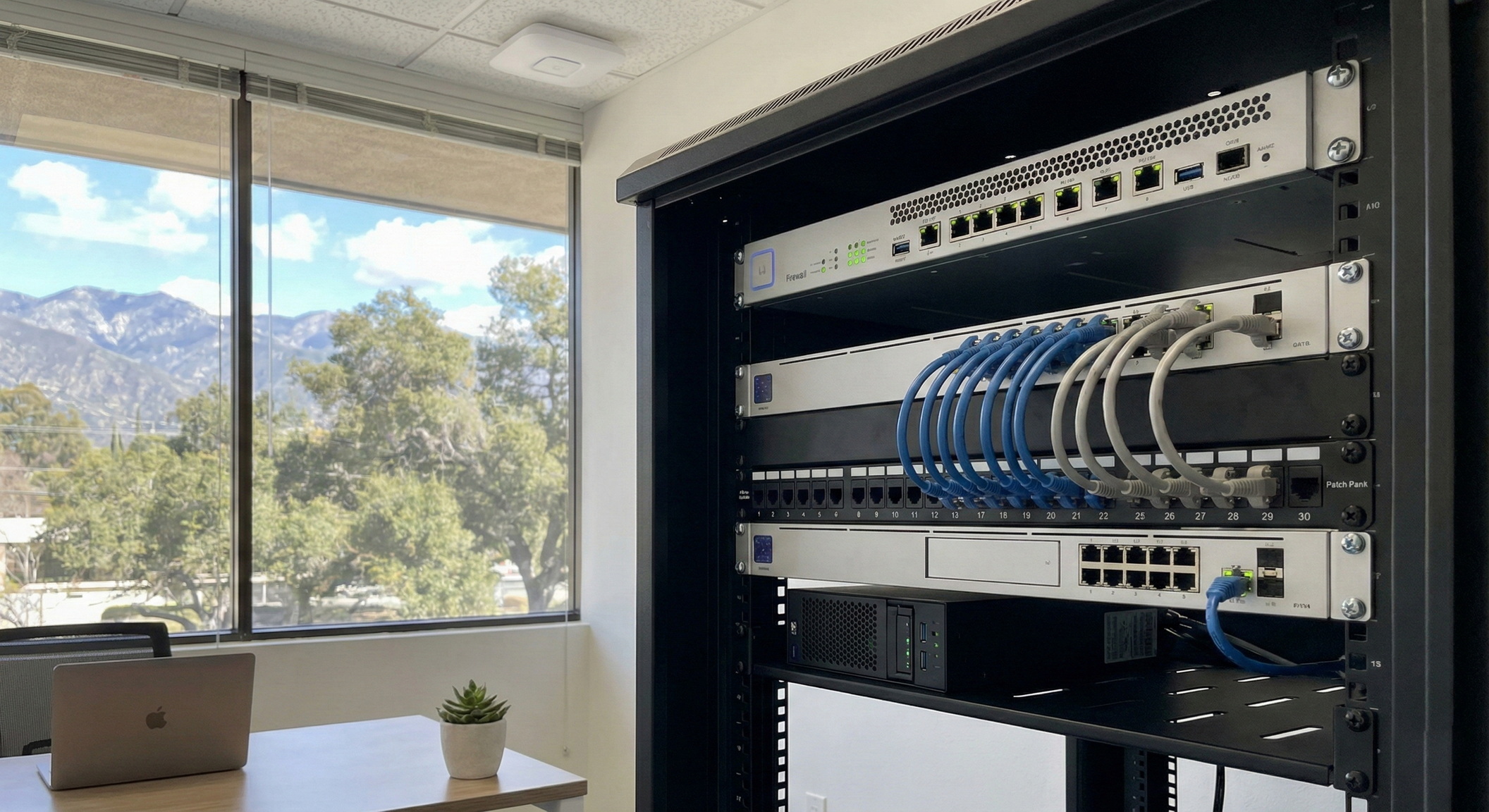
A reliable small business network setup in Altadena isn’t just about getting internet “working.” It’s about building a digital foundation that supports your daily operations—POS systems, VoIP phones, cloud apps, security cameras, and guest Wi‑Fi—without the frustration of constant buffering or security gaps.
Whether you are renovating a historic space near Lake Avenue, moving into a suite on Altadena Drive, or simply trying to fix a router that requires a weekly reboot, the right network design is the difference between smooth operations and costly downtime.
Below is a comprehensive guide to planning a fast, secure network tailored for Altadena businesses, covering everything from ISP choices to structured cabling.
Start With a Network Plan (Before You Buy Hardware)
Many office network problems stem from reactive impulse purchases: a consumer mesh kit from a big-box store, an underpowered “all-in-one” router, or unmanaged switches daisy-chained together over time. This "band-aid" approach inevitably leads to bottlenecks.
Instead, map your requirements before spending a dime. Consider these four pillars:
- Device Density: Count everything, not just laptops. Include VoIP phones, network printers, tablets, smart TVs, door access controllers, thermostats, and security cameras. A 10-person office might easily have 50+ network devices.
- Critical Applications: Does your business rely on real-time data? VoIP, Zoom/Teams calls, telehealth platforms, and cloud accounting require stable, low-latency connections that consumer gear often cannot guarantee.
- Physical Layout & Obstacles: Altadena is home to many older commercial buildings. Walls made of lath and plaster (often containing wire mesh) act as Faraday cages, blocking Wi‑Fi signals. Knowing your building’s construction is vital for access point placement.
- Compliance: Medical (HIPAA), dental, and financial offices need stricter security controls, including log retention and traffic segregation, which basic routers do not offer.
Internet and ISP Considerations in Altadena
Your internal network can only perform as well as the internet connection feeding it. In the foothills, service quality can vary significantly block by block.
When evaluating ISPs (Internet Service Providers), look beyond the "Download Speed" advertised on the flyer:
- Upload Speed: This is often the hidden bottleneck. If you use cloud backups (Dropbox, OneDrive) or host video conferences, a low upload speed (common in cable packages) will freeze your video and choke your network.
- SLA (Service Level Agreement): Business-class internet often comes with an SLA that guarantees uptime and faster repair times compared to residential plans.
- Static IP Addresses: You may need a Static IP for secure VPN access, on-site security camera viewing, or certain whitelisted database applications.
- Failover Redundancy: Internet outages happen. A robust network setup should include a cellular backup (LTE/5G) or a secondary ISP connection that automatically takes over if the primary line fails.
Business Router and Firewall Setup: Your First Line of Defense
The router provided by your ISP is rarely sufficient for a business environment. It lacks the processing power to handle heavy traffic and the security features to stop modern threats.
A dedicated business router and firewall setup is one of the highest-ROI upgrades you can make. For an Altadena office, ensure your firewall supports:
- Intrusion Detection/Prevention (IDS/IPS): Automatically blocks malicious traffic and scanning attempts from the outside world.
- Secure VPN: Allows staff to work remotely or access files from home securely, without exposing your server to the open internet.
- Content Filtering: blocks access to known malware sites and, if desired, productivity-draining categories.
- Quality of Service (QoS): This creates a "fast lane" for voice and video traffic, ensuring that a large file download doesn't cause your phone calls to drop or sound robotic.
Security Note: Never leave default admin usernames (like "admin") and never reuse passwords. This is the most common vector for preventable network breaches.
VLAN Configuration: Why Segmentation Matters
If you only implement one “advanced” feature, make it VLAN (Virtual Local Area Network) configuration. VLANs allow you to chop your single physical network into multiple virtual networks, ensuring that different types of traffic stay separated.
Why is this necessary? Security and performance.
A standard VLAN topology for small businesses:
- VLAN 10 (Staff): Strictly for company assets (PCs, Servers, Printers).
- VLAN 20 (VoIP): Dedicated lane for phones to ensure call quality.
- VLAN 30 (Guest Wi‑Fi): Internet access only. Guests cannot see your server, printers, or other devices.
- VLAN 40 (IoT/Cameras): Security cameras and smart thermostats are notoriously insecure. Isolating them prevents a hacked camera from becoming a backdoor into your accounting files.
Wi‑Fi That Works: Overcoming Interference and Construction
"Full bars" does not always mean good internet. In professional settings, Wi‑Fi issues are usually caused by interference, poor placement, or client congestion.
Best Practices for Business Wi‑Fi:
- Hardwire Everything Possible: If a device has an Ethernet port (printers, desktops, TVs), wire it. This leaves the Wi‑Fi airwaves open for mobile devices that actually need them.
- Ceiling Mounting: Access points should be mounted on the ceiling, clear of obstructions. Hiding them in metal cabinets or behind TVs severely degrades the signal.
- High-Density Capabilities: Business access points are designed to handle 50+ connections simultaneously without crashing; consumer routers often struggle with more than 15.
- Roaming Logic: A managed Wi‑Fi system allows you to walk from the reception area to the conference room without your call dropping, as the system hands your device off to the nearest access point automatically.
Network Cabling Basics: The Backbone of Reliability
Wi‑Fi gets the glory, but structured cabling does the work. No amount of expensive electronics can fix a network attempting to run over damaged or improper wiring.
Key Cabling Guidelines:
- Category Matters: Use Cat6 or Cat6a cabling for all new runs to support 10Gbps speeds in the future.
- Termination Quality: Poorly terminated keystones or patch panels are a leading cause of intermittent "ghost" issues.
- Organization: Label every wall plate and every port on the patch panel. When a specific port dies in two years, you will be thankful you don't have to trace a cable through the ceiling.
- Ventilation: Centralize your equipment in a rack or wall cabinet that allows for airflow. Overheating is the silent killer of networking hardware.
Local Tip: Altadena experiences power fluctuations, especially during wind events. Always install a UPS (Uninterruptible Power Supply) in your network rack to keep the internet alive during brownouts and to condition the power feeding your expensive firewall.
Build for Growth: Switching and Managed Services
A network that "works today" is insufficient if it cannot handle next year's growth.
Scalable Design Principles:
- Managed Switches: Unlike "dumb" switches, managed switches allow for VLANs, remote rebooting of hung devices (via PoE), and traffic monitoring.
- PoE (Power over Ethernet): Plan for a switch with enough power budget to run all your phones and access points without needing bulky power bricks at every desk.
- Documentation: Maintain a "Network Bible" containing IP schemes, passwords, VLAN maps, and ISP account numbers.
This is where managed network services provide immense value. Instead of waiting for something to break, managed services provide proactive firmware updates, security patching, and monitoring to spot ISP latency before it disrupts your day.
FAQ: Small Business Network Setup
How much does a professional network setup cost?
Costs vary by square footage and complexity, but a basic professional setup (Firewall, Switch, Access Points, Cabling) is an infrastructure investment. Expect to budget for business-grade hardware that lasts 5–7 years, rather than consumer gear that is replaced every 18 months.
Do I really need VLANs for a small office of 5 people?
Yes. If you offer Guest Wi‑Fi or have security cameras, you need VLANs. It is a fundamental security practice to keep guest traffic and cheap IoT devices away from your business data.
Why is my Wi‑Fi slow even though I pay for 1 Gig internet?
Wi‑Fi speed is different from internet speed. You may have 1 Gig entering the building, but if you are using an old router, facing interference from neighbors, or trying to punch a signal through lath-and-plaster walls, your device may only receive a fraction of that speed.
Can I just use a Mesh system (like Eero or Orbi)?
Mesh systems are great for homes but often struggle in businesses. They lack advanced VLAN support, have limited security features, and wireless "hops" increase latency (lag). Hard-wired access points are always superior for business stability.
What is the advantage of a Cloud-Managed Network?
Cloud-managed hardware (like Ubiquiti UniFi or Cisco Meraki) allows IT providers to troubleshoot issues, update firmware, and configure settings remotely. This means faster support resolutions without waiting for a technician to drive to your office.
Ready to Upgrade Your Altadena Office Network?
If you are planning an office network installation or need to replace an unreliable setup, Alta Layer can help you design a secure, scalable solution. We specialize in business router and firewall setup, high-density Wi‑Fi optimization, VLAN configuration, and clean structured cabling.
We support businesses across Altadena and the greater Los Angeles area, including Pasadena, Glendale, Burbank, and Sierra Madre.
Contact Alta Layer today to schedule a site assessment and get a practical plan for speed, security, and growth.

